
动态修改样式添加类名
啃一口小胖安 2018/6/5 react
# 动态修改样式添加类名
# 动态修改样式
其实就是在逻辑语句里面写更改后的样子。 例如我想要触发事件以后样式变成绿色
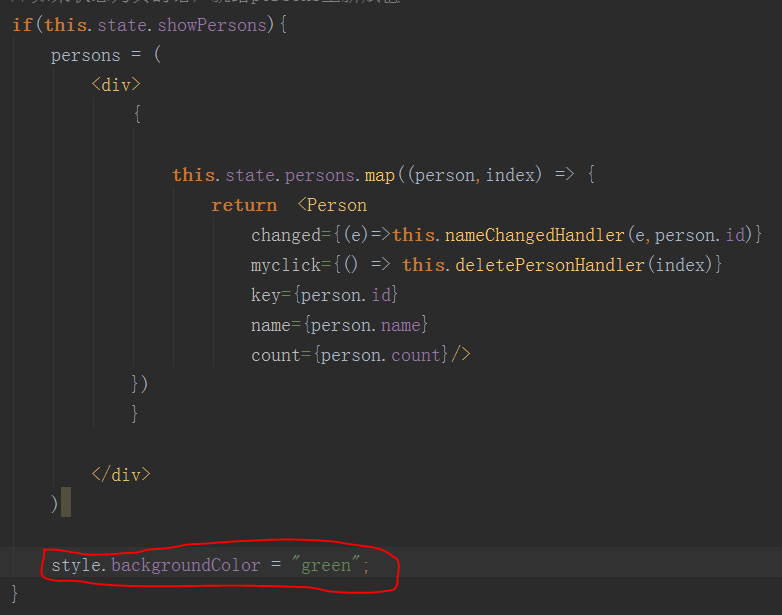
例如我想要删除循环里面一个数据,就给变我的p标签的样式第一步定义

第二步
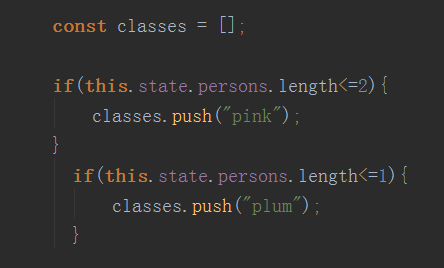
样式自己写,然后引入就好了代码如下
import React, { Component } from 'react';
import './App.css';
import Person from './component/person';

class App extends Component {
  /*
  state:用于改变组件内容状态的值(动态)
  props:用于组件通信进行传值。
  * */
    state = {
        persons:[
            {id:1,name:"sdf",count:10},
            {id:2,name:"sasdf",count:151450},
            {id:3,name:"swer",count:1854651}
        ],
        otherState:"anhthing",
        /*定义一个状态,控制是否展示,默认为不展示,只有为真的时候展示*/
        showPersons:false


    }
    swithNameHandler(newName){
      this.setState({
          persons:[
              {name:newName,count:10},
              {name:"xcb",count:151450},
              {name:"swer",count:11},
          ]
      })
    }
    nameChangedHandler(e,id){
        //拿到这个属于,调用一个方法personIndex,传回来一个对象,
        // 如果这个对象和当前的ID相等,就return回去,得到的就是一个对应的下标
        const personIndex = this.state.persons.findIndex(p => {
            return p.id === id;
        })
        //拿到这个对象,然后把下标放进去,就可以拿到所需要的对象
        const  person = {...this.state.persons[personIndex]}
        //使用person,直接给他赋值,改变当前的内容进行修改
        person.name = e.target.value;
        //拿到当前整个数组,
        const  persons = [...this.state.persons];
        //找到当前数组的对象,然后把修改过得内容付给它
        persons[personIndex] = person;

        //更改当前的状态
        this.setState({
            persons:persons
        })
    }

    togglePersonHandle(){
        //先拿到当前的状态值,是真还是假
        const doesShow = this.state.showPersons;
        this.setState({
            //如果拿到的是false,取非就变成了真,每次点击的话就是改变当前的状态
            showPersons:!doesShow
        })
    }
    deletePersonHandler(personIndex){
        // const  person = this.state.person;
        //操作运算符,后期添加东西方便
        const  persons = [...this.state.persons];
        persons.splice(personIndex,1);
        this.setState({
            persons:persons
        })
    }
  render() {
        const style={
            backgroundColor:'pink',
            color:'white',
            font:'inherit',
            border:'1px solid blue',
            padding:'8px',
            cursor:'pointer'  //小手状态
        };

        let persons = null;  //默认是null
        //如果状态为真的话,就给persons重新赋值
        if(this.state.showPersons){
            persons = (
                <div>
                    {

                        this.state.persons.map((person,index) => {
                            return  <Person
                                changed={(e)=>this.nameChangedHandler(e,person.id)}
                                myclick={() => this.deletePersonHandler(index)}
                                key={person.id}
                                name={person.name}
                                count={person.count}/>
                    })
                    }

                </div>
            )

            style.backgroundColor = "green";
        }

        const classes = [];

        if(this.state.persons.length<=2){
            classes.push("pink");
        }
          if(this.state.persons.length<=1){
              classes.push("plum");
          }

    return(
      <div className="App">
        <h1>hello world</h1>

          <p className={classes.join(" ")}>hi,react app</p>

        <button style={style} onClick={this.togglePersonHandle.bind(this)}>内容切换</button>
          {persons}
       </div>
    );
  }
}

export default App;
1
2
3
4
5
6
7
8
9
10
11
12
13
14
15
16
17
18
19
20
21
22
23
24
25
26
27
28
29
30
31
32
33
34
35
36
37
38
39
40
41
42
43
44
45
46
47
48
49
50
51
52
53
54
55
56
57
58
59
60
61
62
63
64
65
66
67
68
69
70
71
72
73
74
75
76
77
78
79
80
81
82
83
84
85
86
87
88
89
90
91
92
93
94
95
96
97
98
99
100
101
102
103
104
105
106
107
108
109
110
111
112
113
114
115
116
117
118
119
120
121
122
123
124
2
3
4
5
6
7
8
9
10
11
12
13
14
15
16
17
18
19
20
21
22
23
24
25
26
27
28
29
30
31
32
33
34
35
36
37
38
39
40
41
42
43
44
45
46
47
48
49
50
51
52
53
54
55
56
57
58
59
60
61
62
63
64
65
66
67
68
69
70
71
72
73
74
75
76
77
78
79
80
81
82
83
84
85
86
87
88
89
90
91
92
93
94
95
96
97
98
99
100
101
102
103
104
105
106
107
108
109
110
111
112
113
114
115
116
117
118
119
120
121
122
123
124
app.css
.App {
  text-align: center;
}

.plum{
font-weight: bold;
}
.pink{
  color: pink;
}
1
2
3
4
5
6
7
8
9
10
2
3
4
5
6
7
8
9
10